
CFD trading for beginners: Your first trade explained
Reading time: 8 minutes
You’ve picked a trading platform and opened a demo trading account. That's a good place to start if you're learning how to trade CFDs. A demo account lets you spend some time getting used to the platform before putting any real money on the line. You can explore the charts, watch live price movements, try different order types and see how the various tools work. There may be quite a bit to take in at first, but platforms like MetaTrader 4 (MT4) and MetaTrader 5 (MT5) are generally quite intuitive and easy to navigate. During the last few quarters, MT5 has pulled ahead of MT4, accounting for 62% of MetaTrader's market share as recorded in Q3 2025.
To help you get started, here's a step-by-step guide to placing your first order on MetaTrader 4/5.
Key Points
- CFDs allow you to trade on rising and falling markets without owning the underlying asset.
- Before placing a trade, understand key terms such as the bid-ask spread, lot size, margin and leverage.
- Effective risk management is an important part of CFD trading, including setting appropriate Stop Loss and Take Profit levels before placing a trade.
What is a CFD?
Contracts for Difference (CFDs) are derivative instruments that allow you to speculate on an asset's price without owning the asset itself. For example, you do not need to own a physical gold bar, shares or a barrel of crude oil. Instead, you enter into an agreement with a counterparty to exchange the difference in an asset's price from the time the contract opens to when it is closed.
CFDs are popular because they give you flexibility to trade both falling and rising markets. You can buy (go long) if you expect prices to increase, and sell (go short) if you believe prices will drop. Also, CFDs are often traded on leverage, which allows you to open a large position by depositing only a fraction of the total trade value, known as margin. However, increasing your market exposure with leverage multiplies both potential gains and potential losses. This makes risk management crucial for beginners trading CFDs with leverage.
Key terms to know before placing your first CFD trade
Before placing an order, it can help to understand a few basic trading terms.
Bid-ask spread
The bid price is the price at which you can generally sell an asset, while the ask price is the price at which you can generally buy it. The ask price is usually higher than the bid price. The difference between the two prices is called the bid-ask spread and is one of the costs you may incur when trading.
Lot size
Trading positions are measured in lots. For example, in forex trading, one standard lot usually means 100,000 units of the base currency. A mini lot equals 10,000 units (0.10 lots) and a micro lot equals 1,000 units (0.01 lots).
Margin and leverage
If your broker offers 1:30 leverage, the initial margin requirement for a position may be approximately 3.33% of its value, depending on the instrument and applicable margin rules. Leverage allows you to control a larger position with a smaller amount of capital set aside as margin. However, it also increases your market exposure and can amplify both potential gains and potential losses. Understanding how leverage and margin work is therefore important before placing a leveraged CFD trade.
Preparing your MT5 interface
To prepare for your first CFD trade, open your MT5 terminal. The platform interface organises your workflow into three essential sections:
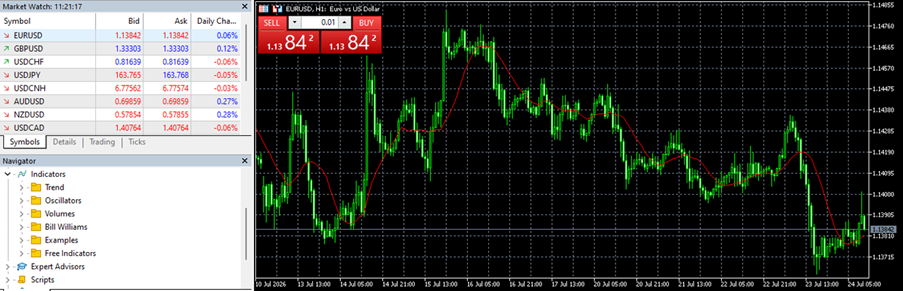
MetaTrader 5 trading platform interface overview
- Market Watch window (top left): displays all available instruments alongside their real-time bid and ask quotes.
- Chart window (centre right): visually maps the historical and live price action of your selected asset using line, bar, or candlestick charts.
- Toolbox Panel (bottom left): offers technical analysis tools, tracks your account equity, open trade metrics and floating profit or loss.
Placing your first CFD trade on MT5
Here is a step-by-step guide to placing a trade on MT5.
Step 1: Open the order window
Locate your target instrument in the Market Watch panel (for example, the EUR/USD currency pair). Right-click the asset name and select New Order. Alternatively, highlight the asset and press F9 on your keyboard. This action opens the dedicated Order Execution panel.
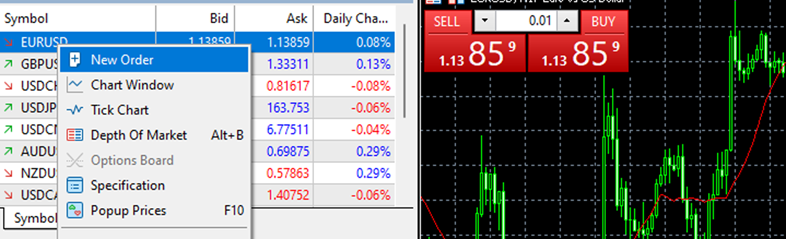
Open order window on MT5
Step 2: Set your position size
Go to the Volume field in the Order window. It can make sense to start with smaller position sizes when you are trading CFDs as a beginner. This can help limit your potential losses while you become more familiar with the platform and the market. For example, you could enter 0.01 in the Volume field, which represents one micro lot, or 0.10, which represents one mini lot.
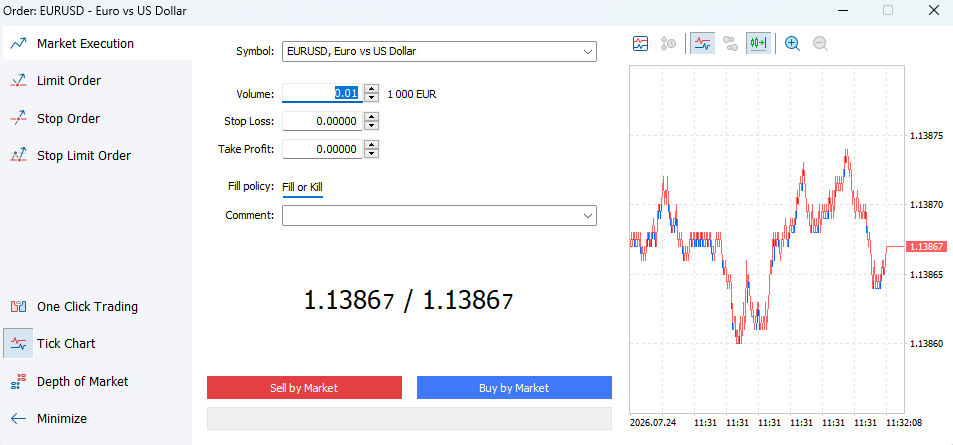
Setting order position size on MT5
Step 3: Set your risk boundaries
Experienced traders recommend not executing a trade without setting your risk limits. For this, enter exact price levels in the Stop Loss and Take Profit fields before placing your order. For example, if you open a buy position on the EUR/USD at 1.13864, you might set your stop loss at 1.13829 (35 pips below) and your take profit at 1.13933 (69 pips above). This would create a potential risk-to-reward ratio of roughly 1:2. These settings can help you define your potential loss and target gain before you place the trade.
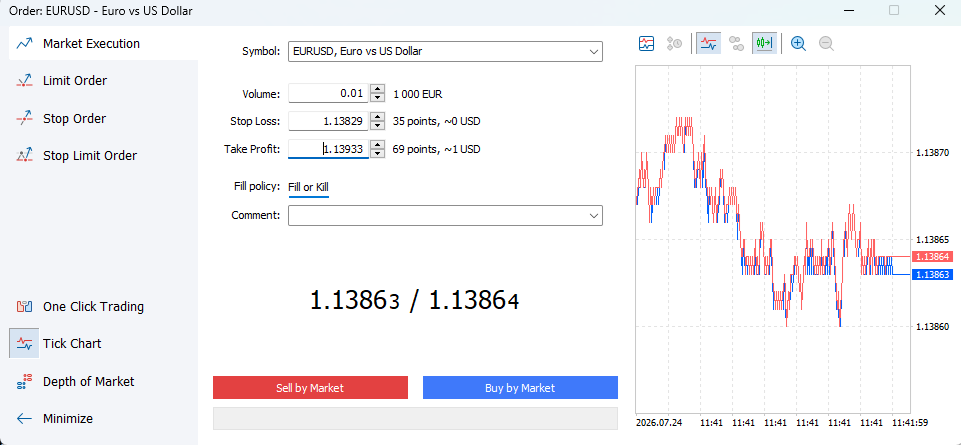
Setting Stop Loss and Take Profit orders on MT5
Step 4: Execute the order
Confirm that the order type reads Market Execution. This setting fills your trade instantly at the best available current price. Click the blue Buy by Market button if you expect the EUR/USD to rise and the red Sell by Market button if you expect it to fall. Once clicked, an audio notification will play, and a confirmation message will display your fill price and unique ticket number.
Monitoring your open position
After executing your order, MT5 immediately transfers the trade details to the Toolbox panel at the bottom of your screen under the Trade tab (bottom right of the dashboard).

Monitoring open positions on MT5
Real-time account parameters to monitor:
- Balance: total realised cash balance, excluding open positions.
- Equity: live account balance adjusted for running profits or losses.
- Margin: minimum cash amount you need to maintain in your account to keep the trade open.
- Free Margin: available equity ready to support new trades (equity - margin).
- Floating Profit/Loss: real-time valuation of your open trade. Note that trades often open with a minor negative figure due to the spread fee.
Closing your position
You can exit an active position using two methods: automated execution or manual closure.
Automated closure
If the price reaches your predefined stop loss or take profit level, MT5 closes the position automatically. The platform converts your floating profit or loss into a settled cash balance instantly.
Manual closure
To exit a trade manually at any point, locate the running position row inside the Toolbox panel under the Trade tab.
- Look to the far right side of the active trade line item.
- Click the small ‘X’ button.
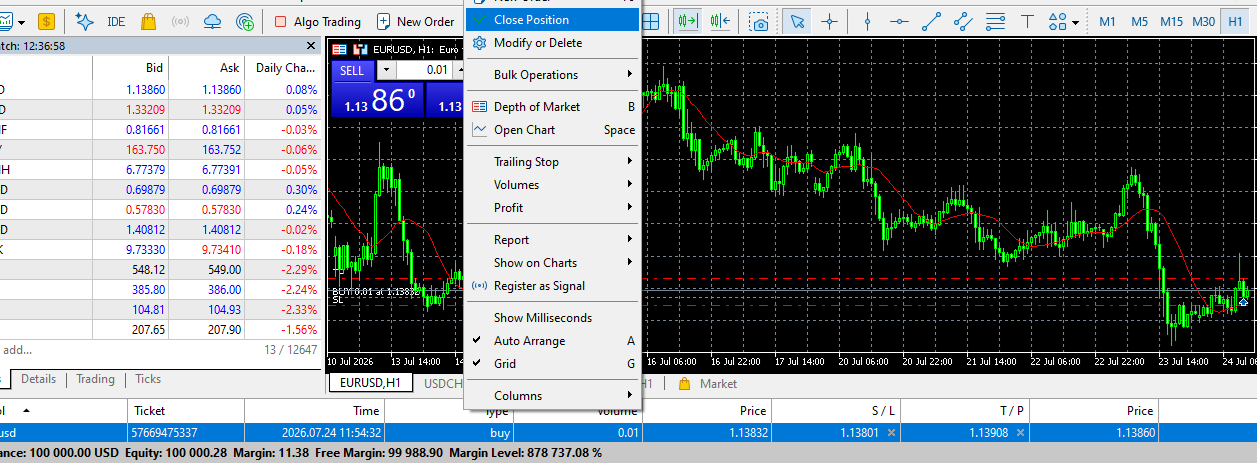
- Alternatively, right-click the open trade row, select Close Position, and click the yellow closure confirmation button.

Manual position exit on MT5
OR
Close position on MT5
Once closed, MT5 logs the entire trade record, including entry price, exit price, timestamps and realised profit/loss. You can find this information in the History tab of the Toolbox panel for your performance review.

Trade history tab on MT5
Best practices for first-time CFD traders
Discipline is important right from your first trade. This helps you build your trading mindset, strategy and skills. Some of the rules frequently followed by traders to protect their capital include:
- Start on a demo account: Practice order execution, stop-loss entry and platform navigation using virtual funds before depositing real money.
- Apply the 1% risk rule: Never risk more than 1% of your total account equity on a single trade. This means if your account holds $5,000, your maximum risk will be capped at $50, depending on market conditions.
- Choose a regulated CFD broker: A licensed broker gives peace of mind that your funds are kept safely in segregated bank accounts and that the execution environment is transparent.
Place your first CFD trade with FP Markets
Practicing how to trade CFDs on a demo account is a crucial starting point for beginners trading CFDs. However, when you move to a live account, you need robust platform infrastructure to support your trades. To execute your trading strategies without delay, you need fast order routing, tight spreads and reliable platform stability.
At FP Markets, we take pride in offering institutional-grade trading resources for traders of all experience levels. Open, manage and close your CFD positions on trading platforms such as MetaTrader 5, MetaTrader 4, TradingView or cTrader with spreads starting from 0.0 pips, deep liquidity access and low-latency execution. Open your account with us to take your next steps in CFD trading.
Frequently asked questions (FAQs)
You can open a new order by selecting your target asset in the Market Watch window and pressing F9 on your keyboard. Alternatively, right-click the asset name and select New Order or click the New Order button located in the top toolbar menu.
You can view all active, open trades in the Toolbox window at the bottom of your screen under the Trade tab. This section displays your entry price, volume, active stop loss, take profit and real-time floating profit or loss.
To close an active trade, locate the position row inside the Trade tab of the Toolbox window. Click the ‘X’ symbol on the far right side of that line item, or right-click the trade row and select ‘Close Position’.